
SpringBoot中通用附件的设计
发布时间:
更新时间:
🕒 阅读时间:29 min read
👀 阅读量:Loading...
该附件设计可以做到业务附件不依赖于业务的数据库,将业务数据库和附件信息隔离开,可以在每个需要保存附件的业务上打上注解,对注解的业务方法进行拦截,用以保存附件信息
缺点:
- 业务数据存储和附件存储是分离开的,还无法联动回滚。
- controller层放在的common中有点不符合开发规范。(规矩是死的,但是人是活的)
1. 数据库设计
DROP TABLE IF EXISTS sys_attachment;CREATE TABLE sys_attachment ( id VARCHAR(64) NOT NULL COMMENT '主键', file_name VARCHAR(100) NOT NULL COMMENT '附件名称', origin_file_name VARCHAR(50) NOT NULL COMMENT '源文件名称', file_suffix VARCHAR(10) NOT NULL COMMENT '文件扩展名 不带.', file_size_kb INT DEFAULT NULL COMMENT '文件所占存储的大小,单位KB', fileUrl VARCHAR(100) NOT NULL COMMENT '存储的文件路径', file_type VARCHAR(40) DEFAULT NULL COMMENT '文件分类', link_id VARCHAR(64) NOT NULL COMMENT '关联业务id', delete_flag BIT(1) NOT NULL DEFAULT b'0' COMMENT '是否删除(0:未删除 1:删除)', create_by VARCHAR(64) DEFAULT NULL COMMENT '创建者', create_time DATETIME DEFAULT NULL COMMENT '创建时间', update_user VARCHAR(64) DEFAULT NULL COMMENT '更新者', update_time DATETIME DEFAULT NULL COMMENT '更新时间', PRIMARY KEY (id)) COMMENT = '附件信息';2. 后端设计
目录结构如下:
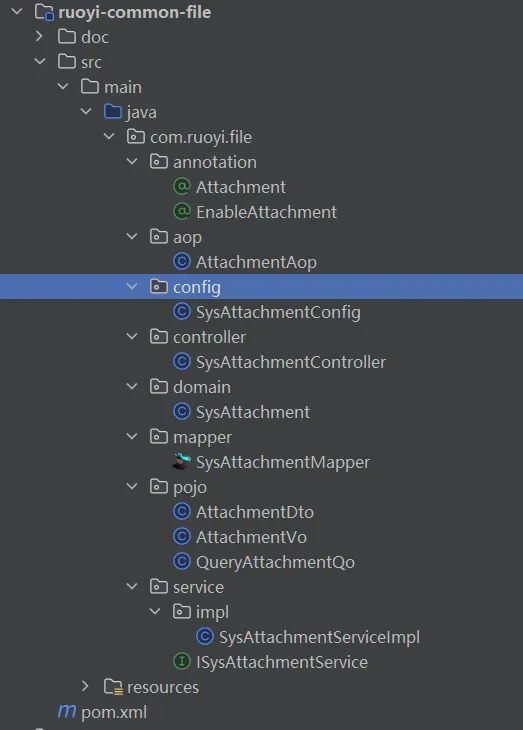
2.1 @Attachment用以放在需要附件的业务方法上
package com.ruoyi.file.annotation;
import org.springframework.stereotype.Component;import java.lang.annotation.*;
/** * 附件注解,用于设置是否保存附件,用于service方法上 * @author congpeitong * @date 2024-12-04 18:36:25 */@Inherited@Documented@Component@Target(ElementType.METHOD) // 用在方法上@Retention(RetentionPolicy.RUNTIME) // 保留至运行期public @interface Attachment {
    // 保存:save / 编辑:update 类型区分  新建时 附件为空则不保存,编辑时附件为空则判断上一次是否有附件,有则删除,无则不处理    String value();
    // 指定 id 字段名 默认为 id    String idField() default "id" ;
    // 指定文件字段 字段名 默认为 files    String fileField() default "files" ;
    // 包含附件数组的参数名称,如果不提供,则以第一个参数为准    String filesParamName() default "";
}
2.2 @EnableAttachment 用于开启附件保存,通常用于SpringBoot的启动类上
package com.ruoyi.file.annotation;
import com.ruoyi.file.aop.AttachmentAop;import com.ruoyi.file.config.SysAttachmentConfig;import com.ruoyi.file.controller.SysAttachmentController;import org.springframework.context.annotation.Import;import java.lang.annotation.*;
/** * 开启附件服务 注解 * @author congpeitong * @date 2024-12-04 15:36:39 */@Documented@Inherited@Target(ElementType.TYPE) // 用在类上@Retention(RetentionPolicy.RUNTIME) // 保留至运行期@Import({SysAttachmentConfig.class, SysAttachmentController.class, AttachmentAop.class})public @interface EnableAttachment {}
2.3 附件保存拦截
package com.ruoyi.file.aop;
import cn.hutool.core.util.ReflectUtil;import com.ruoyi.file.annotation.Attachment;import com.ruoyi.file.domain.SysAttachment;import com.ruoyi.file.service.ISysAttachmentService;import lombok.extern.slf4j.Slf4j;import org.aspectj.lang.ProceedingJoinPoint;import org.aspectj.lang.annotation.Around;import org.aspectj.lang.annotation.Aspect;import org.aspectj.lang.reflect.MethodSignature;import org.springframework.beans.factory.annotation.Autowired;import org.springframework.stereotype.Component;import org.springframework.util.StringUtils;import java.util.ArrayList;import java.util.Arrays;import java.util.List;
/** * @Author congpeitong * @Date 2024/4/19 14:51 */@Aspect@Slf4j@Componentpublic class AttachmentAop {
  @Autowired  private ISysAttachmentService sysAttachmentService;
  /**   * 注解@Attachment方法的拦截   * @author congpeitong   * @date 2024-12-05 08:30:07   * @param point 切入点 及执行的方法(注解标注的方法)    * @param attachment attachment 注解参数   * @return java.lang.Object   */    @Around("@annotation(attachment)")    public Object around(ProceedingJoinPoint point, Attachment attachment) throws Throwable {    // 执行目标方法(即@Attachment注解标注的方法)        Object result = point.proceed();
    // 获取参数列表        Object[] args = point.getArgs();    //没有参数即也没有附件,直接跳出    if(args.length==0){      return result;    }    try {      Object includeFilesParam = null;      //如果注解未设置方法中包含附件列表的参数名,则取第一个参数      String filesParamName = attachment.filesParamName();      if (filesParamName == null || filesParamName.isEmpty()) {        includeFilesParam = args[0];      }
      //设置过参数名      if (includeFilesParam == null && filesParamName != null && !filesParamName.isEmpty()) {        // 参数名列表   获取目标方法上的注解 MethodSignature methodSignature = (MethodSignature) point.getSignature();        List<String> argNames = Arrays.asList(((MethodSignature) point.getSignature()).getParameterNames());        // argNames  args 一一对应        includeFilesParam = args[argNames.indexOf(filesParamName)];      }      //未取到参数对象      if (includeFilesParam == null) {        return result;      }
      Object fieldValueTmp = null;//临时对象      String bizId = "";//业务id      List<SysAttachment> files = new ArrayList<>();
      fieldValueTmp = ReflectUtil.getFieldValue(includeFilesParam, attachment.idField());      if (fieldValueTmp == null) {        throw new RuntimeException("附件关联Id无效");      }      bizId = fieldValueTmp.toString();
      if (!StringUtils.hasLength(bizId)) {        throw new IllegalArgumentException("参数错误,业务id未找到");      }
      //文件列表整理      fieldValueTmp = ReflectUtil.getFieldValue(includeFilesParam, attachment.fileField());      if (fieldValueTmp == null) {        return result; //文件列表属性不存在,不予保存      }      if (!(fieldValueTmp instanceof List)) {        throw new RuntimeException("附件列表格式无效");      }      List<List<?>> tempFileList = (List<List<?>>) fieldValueTmp;      for (List<?> fileList : tempFileList) {        if(fileList!=null) {          List<SysAttachment> filesTmp = (List<SysAttachment>) fileList;          files.addAll(filesTmp);        }      }
      //保存附件      if (("save".equals(attachment.value()) && files.size() != 0) || "update".equals(attachment.value())) {        sysAttachmentService.saveOrUpdateAttachment(bizId,files);      }    } catch (Exception e) {      // 捕获其他潜在异常,进行相应处理。      e.printStackTrace();      throw e;    }        return result;    }}
2.4 附件配置类
package com.ruoyi.file.config;
import com.ruoyi.file.service.ISysAttachmentService;import com.ruoyi.file.service.impl.SysAttachmentServiceImpl;import org.mybatis.spring.annotation.MapperScan;import org.springframework.context.annotation.Bean;import org.springframework.context.annotation.Configuration;
/** * 附件配置类,配置 附件的保存/修改和查询 * @author congpeitong * @date 2024-12-04 15:30:48 */@Configuration@MapperScan(basePackages = "com.ruoyi.file.mapper") // 用于可扫描到附件的mapper文件public class SysAttachmentConfig {
    /**     * 注入附件服务     * @author congpeitong     * @date 2024-12-04 17:42:43     */    @Bean    public ISysAttachmentService sysAttachmentService() {        return new SysAttachmentServiceImpl();    }}
2.5 controller
package com.ruoyi.file.controller;
import com.ruoyi.common.core.domain.R;import com.ruoyi.file.pojo.AttachmentVo;import com.ruoyi.file.pojo.QueryAttachmentQo;import com.ruoyi.file.service.ISysAttachmentService;import org.springframework.util.StringUtils;import org.springframework.web.bind.annotation.*;import java.util.List;
/** * 附件服务控制器 * @author congpeitong * @date 2024-12-04 15:35:10 */@RestController@RequestMapping("/attachment")public class SysAttachmentController {
    private ISysAttachmentService iSysAttachmentService;    public SysAttachmentController(ISysAttachmentService iSysAttachmentService) {        this.iSysAttachmentService = iSysAttachmentService;    }
    /**     * 查询附件信息列表     */    @GetMapping("/queryAttachmentList")    public R<List<AttachmentVo>> queryAttachmentList(QueryAttachmentQo attachmentQo)    {        String linkId = attachmentQo.getLinkId();        if (!StringUtils.hasText(linkId)) {            throw new IllegalArgumentException("未获取到业务,无法查询");        }        List<AttachmentVo> list = iSysAttachmentService.queryAttachmentList(attachmentQo);        return R.ok(list);    }}
2.6实体类
package com.ruoyi.file.domain;
import org.apache.commons.lang3.builder.ToStringBuilder;import org.apache.commons.lang3.builder.ToStringStyle;import com.ruoyi.common.core.annotation.Excel;import com.ruoyi.common.core.web.domain.BaseEntity;
/** * 附件信息对象 sys_attachment * * @author congpeitong * @date 2024-12-04 */public class SysAttachment extends BaseEntity{    private static final long serialVersionUID = 1L;
    /** 主键 */    private String id;
    /** 附件名称 */    private String fileName;
    /** 源文件名称 */    private String originFileName;
    /** 文件扩展名 不带. */    private String fileSuffix;
    /** 文件所占存储的大小,单位KB */    private Long fileSizeKb;
    /** 存储的文件路径 */    private String fileUrl;
    /** 文件分类 */    private String fileType;
    /** 关联业务id */    private String linkId;
    /** 是否删除(0:未删除 1:删除) */    private String deleteFlag;
    /** 更新者 */    private String updateUser;
    public void setId(String id)    {        this.id = id;    }
    public String getId()    {        return id;    }    public void setFileName(String fileName)    {        this.fileName = fileName;    }
    public String getFileName()    {        return fileName;    }    public void setOriginFileName(String originFileName)    {        this.originFileName = originFileName;    }
    public String getOriginFileName()    {        return originFileName;    }    public void setFileSuffix(String fileSuffix)    {        this.fileSuffix = fileSuffix;    }
    public String getFileSuffix()    {        return fileSuffix;    }    public void setFileSizeKb(Long fileSizeKb)    {        this.fileSizeKb = fileSizeKb;    }
    public Long getFileSizeKb()    {        return fileSizeKb;    }    public void setFileUrl(String fileUrl)    {        this.fileUrl = fileUrl;    }
    public String getFileUrl()    {        return fileUrl;    }    public void setFileType(String fileType)    {        this.fileType = fileType;    }
    public String getFileType()    {        return fileType;    }    public void setLinkId(String linkId)    {        this.linkId = linkId;    }
    public String getLinkId()    {        return linkId;    }    public void setDeleteFlag(String deleteFlag)    {        this.deleteFlag = deleteFlag;    }
    public String getDeleteFlag()    {        return deleteFlag;    }    public void setUpdateUser(String updateUser)    {        this.updateUser = updateUser;    }
    public String getUpdateUser()    {        return updateUser;    }
    @Override    public String toString() {        return new ToStringBuilder(this,ToStringStyle.MULTI_LINE_STYLE)                .append("id", getId())                .append("fileName", getFileName())                .append("originFileName", getOriginFileName())                .append("fileSuffix", getFileSuffix())                .append("fileSizeKb", getFileSizeKb())                .append("fileUrl", getFileUrl())                .append("fileType", getFileType())                .append("linkId", getLinkId())                .append("deleteFlag", getDeleteFlag())                .append("createBy", getCreateBy())                .append("createTime", getCreateTime())                .append("updateUser", getUpdateUser())                .append("updateTime", getUpdateTime())                .toString();    }}
2.7 Mapper.java
package com.ruoyi.file.mapper;
import java.util.List;import com.ruoyi.file.domain.SysAttachment;import org.apache.ibatis.annotations.Mapper;import org.apache.ibatis.annotations.Param;
/** * 附件信息Mapper接口 * * @author congpeitong * @date 2024-12-04 */@Mapperpublic interface SysAttachmentMapper{    /**     * 查询附件信息     *     * @param id 附件信息主键     * @return 附件信息     */    public SysAttachment selectSysAttachmentById(String id);
    /**     * 查询附件信息列表     *     * @param sysAttachment 附件信息     * @return 附件信息集合     */    public List<SysAttachment> selectSysAttachmentList(SysAttachment sysAttachment);
    /**     * 新增附件信息     *     * @param entities 附件信息     * @return 结果     */    public int insertSysAttachment(@Param("entities") List<SysAttachment> entities);

    /**     * 删除附件信息     *     * @param id 附件信息主键     * @return 结果     */    public int deleteSysAttachmentById(String id);
    /**     * 根据业务id查询附件信息     * @author congpeitong     * @date 2024-12-09 14:38:42     * @param linkId 业务id     * @return int     */    int deleteSysAttachmentByLinkId(String linkId);
    /**     * 批量删除附件信息     *     * @param ids 需要删除的数据主键集合     * @return 结果     */    public int deleteSysAttachmentByIds(@Param("ids") String[] ids);}
2.8 mapper文件
<?xml version="1.0" encoding="UTF-8" ?><!DOCTYPE mapper        PUBLIC "-//mybatis.org//DTD Mapper 3.0//EN"        "http://mybatis.org/dtd/mybatis-3-mapper.dtd"><mapper namespace="com.ruoyi.file.mapper.SysAttachmentMapper">
    <resultMap type="com.ruoyi.file.domain.SysAttachment" id="SysAttachmentResult">        <result property="id"    column="id"    />        <result property="fileName"    column="file_name"    />        <result property="originFileName"    column="origin_file_name"    />        <result property="fileSuffix"    column="file_suffix"    />        <result property="fileSizeKb"    column="file_size_kb"    />        <result property="fileUrl"    column="fileUrl"    />        <result property="fileType"    column="file_type"    />        <result property="linkId"    column="link_id"    />        <result property="deleteFlag"    column="delete_flag"    />        <result property="createBy"    column="create_by"    />        <result property="createTime"    column="create_time"    />        <result property="updateUser"    column="update_user"    />        <result property="updateTime"    column="update_time"    />    </resultMap>
    <sql id="selectSysAttachmentVo">        select id, file_name, origin_file_name, file_suffix, file_size_kb, fileUrl, file_type, link_id, delete_flag, create_by, create_time, update_user, update_time from sys_attachment    </sql>
    <select id="selectSysAttachmentList" parameterType="com.ruoyi.file.domain.SysAttachment" resultMap="SysAttachmentResult">        <include refid="selectSysAttachmentVo"/>        <where>            <if test="fileName != null  and fileName != ''"> and file_name like concat('%', #{fileName}, '%')</if>            <if test="originFileName != null  and originFileName != ''"> and origin_file_name like concat('%', #{originFileName}, '%')</if>            <if test="fileSuffix != null  and fileSuffix != ''"> and file_suffix = #{fileSuffix}</if>            <if test="fileSizeKb != null "> and file_size_kb = #{fileSizeKb}</if>            <if test="fileUrl != null  and fileUrl != ''"> and fileUrl = #{fileUrl}</if>            <if test="fileType != null  and fileType != ''"> and file_type = #{fileType}</if>            <if test="linkId != null  and linkId != ''"> and link_id = #{linkId}</if>            <if test="deleteFlag != null  and deleteFlag != ''"> and delete_flag = #{deleteFlag}</if>            <if test="updateUser != null  and updateUser != ''"> and update_user = #{updateUser}</if>        </where>        order by create_time desc    </select>
    <select id="selectSysAttachmentById" parameterType="String" resultMap="SysAttachmentResult">        <include refid="selectSysAttachmentVo"/>        where id = #{id}    </select>
    <insert id="insertSysAttachment">        insert into sys_attachment (id,file_name,origin_file_name,file_suffix,file_size_kb,fileUrl,file_type                                   ,link_id,create_by,create_time)        values        <foreach collection="entities" item="entity" separator=",">            (#{entity.id},#{entity.fileName},#{entity.originFileName},#{entity.fileSuffix},#{entity.fileSizeKb},                #{entity.fileUrl},#{entity.fileType},#{entity.linkId},#{entity.createBy},                #{entity.createTime})        </foreach>    </insert>
    <delete id="deleteSysAttachmentById" parameterType="String">        delete from sys_attachment where id = #{id}    </delete>
    <delete id="deleteSysAttachmentByIds" parameterType="String">        delete from sys_attachment where id in        <foreach item="id" collection="ids" open="(" separator="," close=")">            #{id}        </foreach>    </delete>    <delete id="deleteSysAttachmentByLinkId" parameterType="String">        delete from sys_attachment where link_id = #{linkId}    </delete></mapper>
2.9 pojo 总共由三个类 这儿有点不规范,后续再改吧
package com.ruoyi.file.pojo;
import com.ruoyi.common.core.annotation.Excel;
public class AttachmentDto {
    /** 主键 */    private String id;
    /** 附件名称 */    @Excel(name = "附件名称")    private String fileName;
    /** 源文件名称 */    @Excel(name = "源文件名称")    private String originFileName;
    /** 文件扩展名 不带. */    @Excel(name = "文件扩展名 不带.")    private String fileSuffix;
    /** 文件所占存储的大小,单位KB */    @Excel(name = "文件所占存储的大小,单位KB")    private Long fileSizeKb;
    /** 存储的文件路径 */    @Excel(name = "存储的文件路径")    private String fileUrl;
    /** 文件分类 */    @Excel(name = "文件分类")    private String fileType;
    /** 关联业务id */    @Excel(name = "关联业务id")    private String linkId;}

package com.ruoyi.file.pojo;
import com.ruoyi.common.core.annotation.Excel;
/** * 附件vo * @author congpeitong * @date 2024-12-04 17:20:03 */public class AttachmentVo {
    /** 主键 */    private String id;
    /** 附件名称 */    @Excel(name = "附件名称")    private String fileName;
    /** 源文件名称 */    @Excel(name = "源文件名称")    private String originFileName;
    /** 文件扩展名 不带. */    @Excel(name = "文件扩展名 不带.")    private String fileSuffix;
    /** 文件所占存储的大小,单位KB */    @Excel(name = "文件所占存储的大小,单位KB")    private Long fileSizeKb;
    /** 存储的文件路径 */    @Excel(name = "存储的文件路径")    private String fileUrl;
    /** 文件分类 */    @Excel(name = "文件分类")    private String fileType;
    /** 关联业务id */    @Excel(name = "关联业务id")    private String linkId;
    public String getId() {        return id;    }
    public void setId(String id) {        this.id = id;    }
    public String getFileName() {        return fileName;    }
    public void setFileName(String fileName) {        this.fileName = fileName;    }
    public String getOriginFileName() {        return originFileName;    }
    public void setOriginFileName(String originFileName) {        this.originFileName = originFileName;    }
    public String getFileSuffix() {        return fileSuffix;    }
    public void setFileSuffix(String fileSuffix) {        this.fileSuffix = fileSuffix;    }
    public Long getFileSizeKb() {        return fileSizeKb;    }
    public void setFileSizeKb(Long fileSizeKb) {        this.fileSizeKb = fileSizeKb;    }
    public String getFileUrl() {        return fileUrl;    }
    public void setFileUrl(String fileUrl) {        this.fileUrl = fileUrl;    }
    public String getFileType() {        return fileType;    }
    public void setFileType(String fileType) {        this.fileType = fileType;    }
    public String getLinkId() {        return linkId;    }
    public void setLinkId(String linkId) {        this.linkId = linkId;    }
    @Override    public String toString() {        return "AttachmentVo{" +                "id='" + id + '\'' +                ", fileName='" + fileName + '\'' +                ", originFileName='" + originFileName + '\'' +                ", fileSuffix='" + fileSuffix + '\'' +                ", fileSizeKb=" + fileSizeKb +                ", fileUrl='" + fileUrl + '\'' +                ", fileType='" + fileType + '\'' +                ", linkId='" + linkId + '\'' +                '}';    }}


package com.ruoyi.file.pojo;
import java.util.List;
/** * 附件查询对象 * @author congpeitong * @date 2024-12-04 17:15:43 */public class QueryAttachmentQo {
    // 关联的业务id    private String linkId;    // 文件类型    private String fileType;
    public String getLinkId() {        return linkId;    }
    public void setLinkId(String linkId) {        this.linkId = linkId;    }
    public String getFileType() {        return fileType;    }
    public void setFileType(String fileType) {        this.fileType = fileType;    }

}
2.10 service
package com.ruoyi.file.service;
import java.util.List;import com.ruoyi.file.domain.SysAttachment;import com.ruoyi.file.pojo.AttachmentVo;import com.ruoyi.file.pojo.QueryAttachmentQo;
/** * 附件信息Service接口 * * @author congpeitong * @date 2024-12-04 */public interface ISysAttachmentService {    /**     * 查询附件信息     *     * @param id 附件信息主键     * @return 附件信息     */    public SysAttachment selectSysAttachmentById(String id);
    /**     * 查询附件信息列表     *     * @param sysAttachment 附件信息     * @return 附件信息集合     */    public List<SysAttachment> selectSysAttachmentList(SysAttachment sysAttachment);
    /**     * 批量删除附件信息     *     * @param ids 需要删除的附件信息主键集合     * @return 结果     */    public int deleteSysAttachmentByIds(String[] ids);
    /**     * 删除附件信息信息     *     * @param id 附件信息主键     * @return 结果     */    public int deleteSysAttachmentById(String id);
    /**     * 查询附件列表     * @author congpeitong     * @date 2024-12-04 17:24:59     */    List<AttachmentVo> queryAttachmentList(QueryAttachmentQo attachmentQo);
    /**     * 保存或更新附件信息     * @author congpeitong     * @date 2024-12-04 18:50:08     * @param attachments 附件列表     * @return void     */    void saveOrUpdateAttachment(String bizId, List<SysAttachment> attachments);}


package com.ruoyi.file.service.impl;
import com.ruoyi.common.core.utils.DateUtils;import com.ruoyi.common.core.utils.uuid.IdUtils;import com.ruoyi.common.security.utils.SecurityUtils;import com.ruoyi.file.domain.SysAttachment;import com.ruoyi.file.mapper.SysAttachmentMapper;import com.ruoyi.file.pojo.AttachmentVo;import com.ruoyi.file.pojo.QueryAttachmentQo;import com.ruoyi.file.service.ISysAttachmentService;import org.springframework.beans.BeanUtils;import org.springframework.beans.factory.annotation.Autowired;import org.springframework.stereotype.Service;import org.springframework.transaction.annotation.Transactional;import org.springframework.util.CollectionUtils;import org.springframework.util.StringUtils;import java.util.ArrayList;import java.util.HashSet;import java.util.List;import java.util.Set;import java.util.stream.Collectors;
/** * 附件信息Service业务层处理 * * @author congpeitong * @date 2024-12-04 */@Servicepublic class SysAttachmentServiceImpl implements ISysAttachmentService{    @Autowired    private SysAttachmentMapper sysAttachmentMapper;
    /**     * 查询附件信息     *     * @param id 附件信息主键     * @return 附件信息     */    @Override    public SysAttachment selectSysAttachmentById(String id)    {        return sysAttachmentMapper.selectSysAttachmentById(id);    }
    /**     * 查询附件信息列表     *     * @param sysAttachment 附件信息     * @return 附件信息     */    @Override    public List<SysAttachment> selectSysAttachmentList(SysAttachment sysAttachment)    {        return sysAttachmentMapper.selectSysAttachmentList(sysAttachment);    }
    /**     * 批量删除附件信息     *     * @param ids 需要删除的附件信息主键     * @return 结果     */    @Override    public int deleteSysAttachmentByIds(String[] ids)    {        return sysAttachmentMapper.deleteSysAttachmentByIds(ids);    }
    /**     * 删除附件信息信息     *     * @param id 附件信息主键     * @return 结果     */    @Override    public int deleteSysAttachmentById(String id)    {        return sysAttachmentMapper.deleteSysAttachmentById(id);    }
    /**     * 查询附件列表 linkId:业务id, fileType:业务类型     * @author congpeitong     * @date 2024-12-04 17:25:21     */    @Override    public List<AttachmentVo> queryAttachmentList(QueryAttachmentQo attachmentQo) {        List<AttachmentVo> resultList = new ArrayList<>();        SysAttachment sysAttachment = new SysAttachment();        BeanUtils.copyProperties(attachmentQo, sysAttachment);        sysAttachment.setDeleteFlag("0");        List<SysAttachment> sysAttachments = sysAttachmentMapper.selectSysAttachmentList(sysAttachment);
        for (SysAttachment attachment : sysAttachments) {            AttachmentVo attachmentVo = new AttachmentVo();            BeanUtils.copyProperties(attachment, attachmentVo);            resultList.add(attachmentVo);        }        return resultList;    }
    /**     * 保存附件信息,由于不存在更新所以只进行保存和删除操作     * @author congpeitong     * @date 2024-12-04 18:50:36     * @param bizId 业务id     * @param attachments 附件信息列表     */    @Override    @Transactional    public void saveOrUpdateAttachment(String bizId, List<SysAttachment> attachments) {        if (!StringUtils.hasText(bizId)) {            throw new IllegalArgumentException("业务id为空,附件未成功保存");        }        // 附件列表为空,则根据业务id删除所有的该业务相关的附件        if (CollectionUtils.isEmpty(attachments)) {            this.sysAttachmentMapper.deleteSysAttachmentByLinkId(bizId);            return;        }        /* 当保存的附件不为空时,查询旧附件信息,保存的附件信息和旧附件信息作对比 */        // 查询已存在的附件        SysAttachment exitFileQuery = new SysAttachment();        exitFileQuery.setLinkId(bizId);        List<SysAttachment> exitFiles = this.sysAttachmentMapper.selectSysAttachmentList(exitFileQuery);        // 数据库中不存在附件直接批量新增        if (CollectionUtils.isEmpty(exitFiles)) {            List<SysAttachment> saveList = attachments.stream()                    .peek(attachment -> setAttachmentInfo(bizId, attachment))                    .collect(Collectors.toList());            this.sysAttachmentMapper.insertSysAttachment(saveList);            return;        }        // 对比 接口传过来的附件数据和数据库中存在的数据,该新增新增,该删除删除        processAttachments(bizId, attachments, exitFiles);    }
    /**     * 比对新旧数据保存至数据库,由于只有新增和删除,因此对比比较简单     * 先根据 附件url对比出 共有的数据     *      接口中过来的数据中去除共有的数据即为新增的数据     *      数据库中已存在的数据去除共有数据即为删除的数据     * @author congpeitong     * @date 2024-12-05 10:51:12     * @param bizId 业务id     * @param newAttachments 接口传过来的数据     * @param existingAttachments 数据库中已经存在的数据     */    private void processAttachments(String bizId,List<SysAttachment> newAttachments, List<SysAttachment> existingAttachments) {        // 1. 查找共同部分        Set<String> fileUrls = new HashSet<>();        for (SysAttachment newAttachment : newAttachments) {            fileUrls.add(newAttachment.getFileUrl());        }        // 共同部分        List<SysAttachment> commonAttachments = existingAttachments.stream()                .filter(existingAttachment -> fileUrls.contains(existingAttachment.getFileUrl()))                .collect(Collectors.toList());        List<SysAttachment> saveList;        List<String> deleteIds;        //  如果有共同部分,接口数据中除去共同部分的数据为新增的数据,数据库中存在的数据除去共同部分为删除的数据        if (!CollectionUtils.isEmpty(commonAttachments)) {            List<String> commonUrls = commonAttachments.stream()                    .map(SysAttachment::getFileUrl)                    .collect(Collectors.toList());            saveList = newAttachments.stream()                    .filter(attachment -> !commonUrls.contains(attachment.getFileUrl()))                    .peek(attachment -> setAttachmentInfo(bizId, attachment))                    .collect(Collectors.toList());
            deleteIds = existingAttachments.stream()                    .filter(attachment -> !commonUrls.contains(attachment.getFileUrl()))                    .map(SysAttachment::getId)                    .collect(Collectors.toList());        } else { // 如果无共同部分,则接口传过来的数据全部新增,数据库中存在的数据全部删除            saveList = newAttachments.stream()                    .peek(attachment -> setAttachmentInfo(bizId, attachment))                    .collect(Collectors.toList());            deleteIds = existingAttachments.stream().map(SysAttachment::getId).collect(Collectors.toList());        }
        // 操作数据库数据        if (!CollectionUtils.isEmpty(saveList)) {            this.sysAttachmentMapper.insertSysAttachment(saveList);        }        if (!CollectionUtils.isEmpty(deleteIds)) {            this.sysAttachmentMapper.deleteSysAttachmentByIds(deleteIds.toArray(new String[0]));        }    }
    /**     * 设置附件信息     * @author congpeitong     * @date 2024-12-05 09:22:13     * @param linkId 业务id     * @param sysAttachment 附件信息     */    private void setAttachmentInfo(String linkId, SysAttachment sysAttachment) {        if (sysAttachment == null || !StringUtils.hasText(linkId)) return;        // 设置id        sysAttachment.setId(IdUtils.simpleUUID());        // 设置业务id        sysAttachment.setLinkId(linkId);        String fileName = sysAttachment.getFileName();        if (!StringUtils.hasText(fileName)) return;        /* 文件保存后的文件名命名规则为 原文件名_一串日期时间编码.扩展名  例如 附件_202412050950.png  即原文件名为 附件.png */        // 原文件名称,不带扩展名的        String originFileName;        // 文件扩展名 不带 . 的        String fileExtName;        int _index = fileName.indexOf("_");        int dotIndex = fileName.lastIndexOf(".");        if (_index == -1 || dotIndex == -1) return;        fileExtName = fileName.substring(dotIndex + 1);        // 原文件名如果前端传值了按照前端传值的保存,没传值则截取上传后的文件名第一个_前面的然后拼接扩展名        if (!StringUtils.hasText(sysAttachment.getOriginFileName())){            originFileName = fileName.substring(0, _index);            sysAttachment.setOriginFileName(originFileName + "." + fileExtName);        }        sysAttachment.setFileSuffix(fileExtName);        // 设置创建时间        sysAttachment.setCreateTime(DateUtils.getNowDate());        // 设置创建人        sysAttachment.setCreateBy(SecurityUtils.getUsername());    }}
3. 前端
前端使用的是vue2做了一个组件
<!--文件上传/查看组件--><template>  <div class="upload-file">    <el-upload        ref="fileUpload"        :action="uploadFileUrl"        :before-upload="handleBeforeUpload"        :file-list="fileList"        :headers="headers"        :on-exceed="handleExceed"        :on-error="handleUploadError"        :on-remove="handleRemove"        :on-preview="handlePreview"        :auto-upload="autoUpload"        :on-progress="handleProgress"        :on-success="handleUploadSuccess"        class="myupload"        multiple        :limit="limit"        list-type="picture-card"        :disabled="isDetail"    >      <i slot="default" class="el-icon-plus" v-if="!isDetail && !isScreenshot"></i>      <div slot="default" class="screenshot" v-if="!isDetail && isScreenshot">        <div class="s-btn"><el-button type="primary" style="padding:5px 10px;">上传文件</el-button></div>        <div class="s-btn" @click.stop="screenshotUpload"><el-button type="primary" style="padding:5px 10px;">上传截图</el-button></div>      </div>
      <div slot="file" slot-scope="{file}" style="text-align: center;">        <img class="el-upload-list__item-thumbnail" :src="file.fileUrl"/>        <div class="filetext el-upload-list__item-file-name">{{file.originFileName}}</div>        <div class="el-upload-list__item-actions"             v-if="['png','jpg','jpeg','gif','PNG','JPG','JPEG','GIF','mp4','MP4'].indexOf(file.fileSuffix) != -1" >          <span class="el-upload-list__item-preview" @click="preview(file)">                <i class="el-icon-zoom-in"></i>          </span>          <span @click="handlePreview(file)">                 <i class="el-icon-download"></i>          </span>          <span class="el-upload-list__item-delete" @click="remove(file)" v-if="!isDetail">                <i class="el-icon-delete"></i>          </span>        </div>        <div class="el-upload-list__item-actions" v-else>          <span @click="handlePreview(file)">                 <i class="el-icon-download"></i>          </span>          <span class="el-upload-list__item-delete" @click="remove(file)" v-if="!isDetail">                 <i class="el-icon-delete"></i>          </span>        </div>      </div>      <div slot="tip" v-if="!isDetail">        <div v-if="isShowTip" class="divline">          <slot></slot>          <template v-if="fileSize">            大小不超过 <b style="color: #f56c6c">{{ fileSize }}MB</b></template>          <template v-if="fileType">            格式为 <b style="color: #f56c6c">{{ fileType.join('/') }}</b>的文件          </template>          <slot name="afterbody-tip"></slot>        </div>      </div>    </el-upload>    <!-- 图片预览-->    <el-dialog :visible.sync="dialogVisible" width="50%" append-to-body>      <el-image :src="dialogImageUrl" :zoon-rate="1.2" :max-scale="7" :preview-src-list="dialogImageUrlList" style="width:100%;"></el-image>    </el-dialog>    <!-- 视频预览-->    <el-dialog :visible.sync="videoDialogVisible" width="50%" append-to-body>      <video :src="dialogImageUrl" controls  style="width:100%;height:600px;" autoPlay></video>    </el-dialog>    <!-- 粘贴截图-->    <el-dialog :visible.sync="screenshotDialogVisible" width="50%" title="上传截图" destroy-on-close :before-close="pasteBeforeClose" append-to-body>      <div v-if="!pasteimgSrc">        <textarea ref="pasteRef" rows="30" class="area" placeholder="粘贴截图" @paste="pasteInput"></textarea>      </div>      <div v-if="pasteimgSrc">        <el-image :src="pasteimgSrc" :zoon-rate="1.2" :max-scale="7" :preview-src-list="pasteimgSrcList" ></el-image>      </div>      <div slot="footer">        <div class="dialog-footer">          <el-input v-model="screenshotName" placeholder="输入截图名称" style="width: 240px;margin-right:20px;"></el-input>          <el-button type="primary" @click="handleHttpUpload(screenshotFile)">            上传          </el-button>          <el-button type="primary" @click="cancelImage">清除截图</el-button>          <el-button @click="cancel">取消</el-button>        </div>      </div>    </el-dialog>  </div></template>
<script>import { getToken } from "@/utils/auth";import { Loading } from 'element-ui';import request from "@/utils/request";import {getListByReview,downBlobFile} from "@/api/material/attachment";export default {  name: 'upload-file',  props: {    // 值    value: [Array],    // 数量限制    limit: {      type: Number,      default: 9,    },    // 大小限制(MB)    fileSize: {      type: Number,      default: 20,    },    fileType: {      type: Array,      default: () => ['png', 'jpg', 'jpeg', 'doc', 'xls', 'ppt', 'txt', 'pdf', 'docx', 'xlsx', 'pptx', 'mp4','zip','rar'],    },    // 是否显示提示    isShowTip: {      type: Boolean,      default: true,    },    uploadFileUrl: {      type: String,      default: process.env.VUE_APP_BASE_API + "/file/upload", // 此处自己的微服务有自己的API上下文/服务路由(process.env.VUE_APP_BASE_API)    },    autoUpload: {      type: Boolean,      default: true,    },    attachmentData:{      type: Object,      default: () => {},    },//外面传过来的附件详情的请求参数    linkId:{ // 业务id      type: String,      default: '',    },    isDetail:{      type: Boolean,      default: false,    }, //外面页面如果是查看详情传true,    isScreenshot: {      type: Boolean,      default: false,    }, //是否显示截图上传按钮  },  data() {    return {      number: 0,      uploadList: [],      headers: {        认证key: "认证前缀 " + getToken(),      },      fileList: this.value,      dialogImageUrl: '',      dialogVisible: false,      videoDialogVisible: false,      screenshotDialogVisible: false,      dialogImageUrlList: [],      loadingInstance:null,      pasteimgSrc: '',      pasteimgSrcList: [],      screenshotFile: null,      screenshotName: '',      //静态图片      word: require('@./assets/upload/docx.png'),      ppt: require('@./assets/upload/ppt.png'),      excel: require('@./assets/upload/excel.png'),      pdf: require('@./assets/upload/pdf.png'),      img: require('@./assets/upload/img.png'),      txt: require('@./assets/upload/txt.png'),      mp4: require('@./assets/upload/mp4.png'),      file: require('@./assets/upload/file.png'),      zip: require('@./assets/upload/zip.png'),    }  },  watch: {    value: {      handler(newVal) {        this.fileList = newVal      },      deep: true,      immediate: true    },    linkId: {      handler(newValue, oldValue) {        this.fileList = this.fileList ? this.fileList : []        if(newValue !== oldValue ) {          if(!newValue){            this.fileList.splice(0,this.fileList.length)          }          this.getAttachmentList();        } else {          if(this.fileList.length==0){            this.getAttachmentList();          }        }      },      deep: true,      immediate: true    },    fileList : {      handler(val) {        if(!val){          this.fileList = []        }        this.$nextTick(() => {          let fileElementList = document.getElementsByClassName('el-upload-list__item is-success');          if (fileElementList && fileElementList.length > 0) {            for (let ele of fileElementList) {              let fileName = ele.innerText;              //获取文件名后缀              let fileType = fileName.substring(fileName.lastIndexOf(".") + 1);              let iconElement = ele.getElementsByClassName('el-upload-list__item-thumbnail')[0];              if (['doc','docx','DOC','DOCX'].indexOf(fileType) != -1) {                iconElement.src = this.word // 文档              } else if (['xls','xlsx','XLS','XLSX'].indexOf(fileType) != -1) {                iconElement.src = this.excel // 表格              } else if (['ppt','pptx','PPT','PPTX'].indexOf(fileType) != -1) {                iconElement.src = this.ppt // PPT              }  else if (['pdf','PDF'].indexOf(fileType) != -1) {                iconElement.src = this.pdf // PDF              } else if (['txt'].indexOf(fileType) != -1) {                iconElement.src = this.txt // PDF              } else if (['mp4'].indexOf(fileType) != -1) {                iconElement.src = this.mp4 // mp4视频              } else if (['zip','rar'].indexOf(fileType) != -1) {                iconElement.src = this.zip // 压缩              } else if (['jpg','JPG', 'png', 'PNG', 'jpeg', 'JPEG'].indexOf(fileType) != -1) {
              }else {                iconElement.src = this.file              }            }          }        })      },      deep: true,      immediate: true    },    screenshotDialogVisible: {      handler(newValue, oldValue) {        if (newValue) {          this.$nextTick(() => {            this.$nextTick(() => {              this.$refs.pasteRef.focus();            })          })        }      },      deep: true,      immediate: true    },  },  methods: {    // //删除当前文件    async remove(file) {      await this.$modal.confirm('您确定要删除该文件?')      let index = this.fileList.indexOf(file)      this.fileList.splice(index, 1)      this.$emit("input",this.fileList);    },    // 上传前校检格式和大小    handleBeforeUpload(file) {      // 校检文件类型      if (this.fileType.length) {        const fileName = file.name.split('.');        const fileExt = fileName[fileName.length - 1];        const isTypeOk = this.fileType.indexOf(fileExt) >= 0;        if (!isTypeOk) {          this.$modal.msgError(`文件类型错误, 请上传${this.fileType.join("/")}格式文件!`);          return false;        }      }      // 校检文件大小      if (this.fileSize) {        const isLt = file.size / 1024 / 1024 < this.fileSize;        if (!isLt) {          this.$modal.msgError(`文件大小不超过${this.fileSize}MB!`);          return false;        }      }      this.number++;      return true;    },    //文件上传时的回调    handleProgress(event, file) {      this.loadingInstance = Loading.service({        text:'附件正在上传中...'      })    },    // 上传成功回调    handleUploadSuccess(res, file) {      try {        this.loadingInstance.close()        if (res.code === 200) {          let fileName = file.name.split('.');          this.uploadList.push({            originFileName: file.name,            fileName: res.data.name,            fileUrl: res.data.url,            fileSizeKb: file.size / 1024,            fileType: this.attachmentData.fileType,            fileSuffix: fileName[fileName.length - 1]          });          this.uploadedSuccessfully();        } else {          this.number--;          this.$modal.msgError(res.msg);          this.$refs.fileUpload.handleRemove(file);          this.uploadedSuccessfully();        }      } catch(e) {        this.loadingInstance.close()      }    },    // 上传结束处理    uploadedSuccessfully(res) {      if (this.number > 0 && this.uploadList.length === this.number) {        //this.uploadList.forEach(item => item.dir = props.dir);        this.fileList = this.fileList.filter((f) => f.fileUrl !== undefined).concat(this.uploadList);        this.uploadList = [];        this.number = 0;        this.$emit("input", this.fileList);      }    },    //文件列表移除文件时的钩子    handleRemove(file) {      this.fileList = this.fileList.filter((f) => !(f === file.fileUrl));    },    // 文件个数限制提示    handleExceed() {      this.$modal.msgError(`只允许上传${this.limit}个文件!`);    },    //文件上传失败构子    handleUploadError() {      this.$modal.msgError('上传文件失败');    },    //文件下载    async handlePreview(file) {      console.log('files',file)      try {        this.loadingInstance = Loading.service({          text:'附件下载中...'        })        await downBlobFile(file.fileUrl, {}, file.fileName);        this.loadingInstance.close()      } catch(e) {        this.loadingInstance.close()      }    },    //文件预览    preview(file) {      this.dialogImageUrlList.splice(0,this.dialogImageUrlList.length)      //let fileType = file.fileUrl.substring(file.fileUrl.lastIndexOf(".") + 1);      if(['png','jpg','jpeg',".gif",'PNG','JPG','JPEG',"GIF"].indexOf(file.fileSuffix) != -1){        this.dialogVisible = true        this.dialogImageUrl =  file.fileUrl        this.dialogImageUrlList.push(this.dialogImageUrl)      } else if(['mp4','MP4'].indexOf(fileType) != -1) {        this.dialogImageUrl =  file.fileUrl        this.videoDialogVisible = true      }    },    //截图上传弹框    screenshotUpload() {      this.screenshotDialogVisible = true    },    //生成A-Z加数字 随机数    gdCode() {      let str = 'ABCDEFGHIJKLMNOPQRSTUVWXYZ';      let arr = str.split("")      let n = Math.round(Math.random() * (arr.length -1))      return arr[n] + Math.floor(Math.random() * 10)    },    //截图粘贴上传    pasteInput(event) {      this.pasteimgSrcList.splice(0,this.pasteimgSrcList.length)      let item =  event.clipboardData?.items[0];      if(!item) {        return      }      if(item &&(item.type.indexOf('image') > -1 )){        let file =  item.getAsFile()        this.screenshotFile = file        const reader = new FileReader(); // 创建新的读取文件 FileReader 实例        reader.onload = (e) => {          this.pasteimgSrc = e.target.result  // 获取文件内容          this.pasteimgSrcList.push(e.target.result)        }        reader.readAsDataURL(file)  // 读取文件内容二进制数据,并将其编码为 base64 的 data url      }    },    //截图上传请求    async handleHttpUpload (file) {      let formData = new FormData();      formData.append('file', file);      //formData.append('dir', props.dir);      try {        const res = await request({          url:  "/file/upload",          method: 'post',          headers: this.headers,          data: formData,        });        let fileName = file.name.split('.');        let screenshotFileName = ''        if(this.screenshotName){          screenshotFileName = this.screenshotName + '.' + fileName[fileName.length - 1]        } else {          screenshotFileName = '截图' + this.gdCode() + '.' + fileName[fileName.length - 1]        }        this.fileList.push({          originFileName: screenshotFileName,          fileName: res.data.name,          fileUrl: res.data.url,          fileSizeKb: file.size / 1024,          fileType: this.attachmentData.fileType,          fileSuffix: fileName[fileName.length - 1]        });        this.$emit("input", this.fileList);        this.pasteimgSrc = null        this.screenshotName = ''      } catch (error) {        this.$modal.msgError("上传文件失败");        this.pasteimgSrc = null        this.screenshotName = ''      }      this.screenshotDialogVisible = false    },    //清除粘贴内容和粘贴板    cancelImage() {      this.pasteimgSrc = null      this.screenshotName = ''      navigator.clipboard.writeText('')    },    cancel() {      this.pasteimgSrc = null      this.screenshotName = ''      this.screenshotDialogVisible = false    },    pasteBeforeClose(done) {      this.pasteimgSrc = null      this.screenshotName = ''      done()    },    //获取附件列表    getAttachmentList() {      if(this.attachmentData.linkId) {        let params = {          linkId:this.attachmentData.linkId,          fileType:this.attachmentData.fileType,        }        getListByReview(params).then((res) => {          this.fileList.splice(0,this.fileList.length)          res.data.forEach(item => {            this.fileList.push(item)          })        })      }    },  }}</script>
<style scoped lang="scss">.upload-file{  width:100%;}.f-position{  position: relative;  cursor: pointer;  .f-icon{    position: absolute;    top:0;    right:0;  }}::v-deep .el-upload-list--picture-card .el-upload-list__item {  width: 130px;  height:130px;}::v-deep .el-dialog__header {  padding-bottom: 0 !important;}::v-deep .el-dialog__body {  padding:15px 20px;}::v-deep .el-upload-list--picture-card .el-upload-list__item-thumbnail {  height:105px;  width:95%;}::v-deep .el-upload--picture-card {  width:130px;  height:130px;}
.filetext{  margin-top:-7px;}.divline{  line-height: 24px;}.d-auto{  width: 80%;  margin: 0 auto;  margin-top: 11px;}.d-auto1{  width: 80%;  margin: 0 auto;  margin-top: 40px;}.screenshot{  width: 100%;  display: flex;  flex-direction: column;}.s-btn{  width: 100%;  height: 44px;  display: flex;  justify-content: center;  align-items: center;  margin-top:10px;}.area {  width:100%;  border:1px solid #dcdfe6;}</style>
4. 具体使用方式
4.1 前端使用
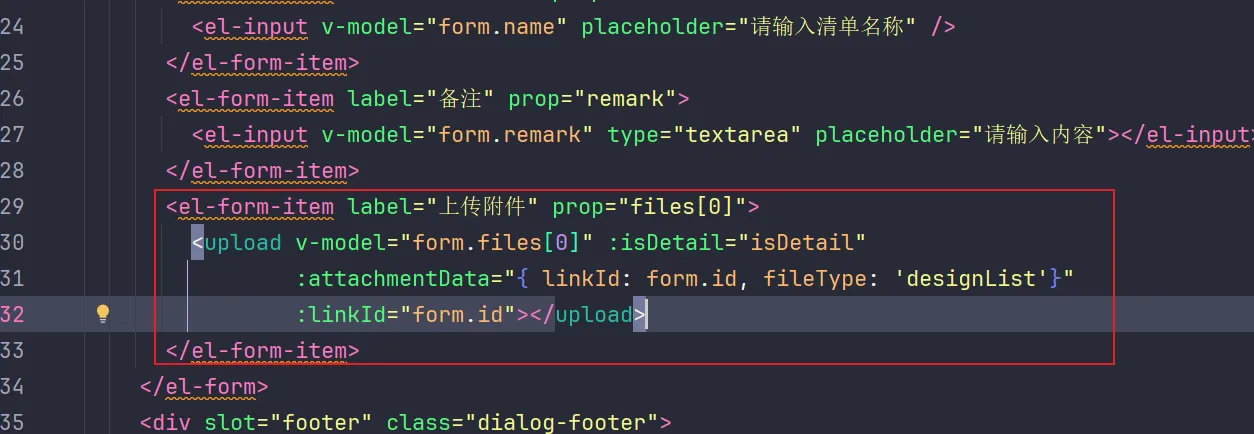
说明:
- form.files[0]:实际上这儿设置的二维数组,存储的是上传的附件信息,如果有多个upload组件引用则是files[1], files[2] …
- linkId:及业务id
- fileType: 附件的业务类型,只是语义上的意义,其实没有太大的实际意义。用于为业务附件分类的
4.2 后端的使用
-
引入附件 common
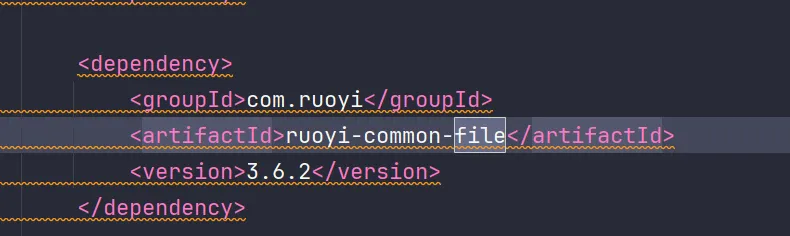
-
开启附件服务
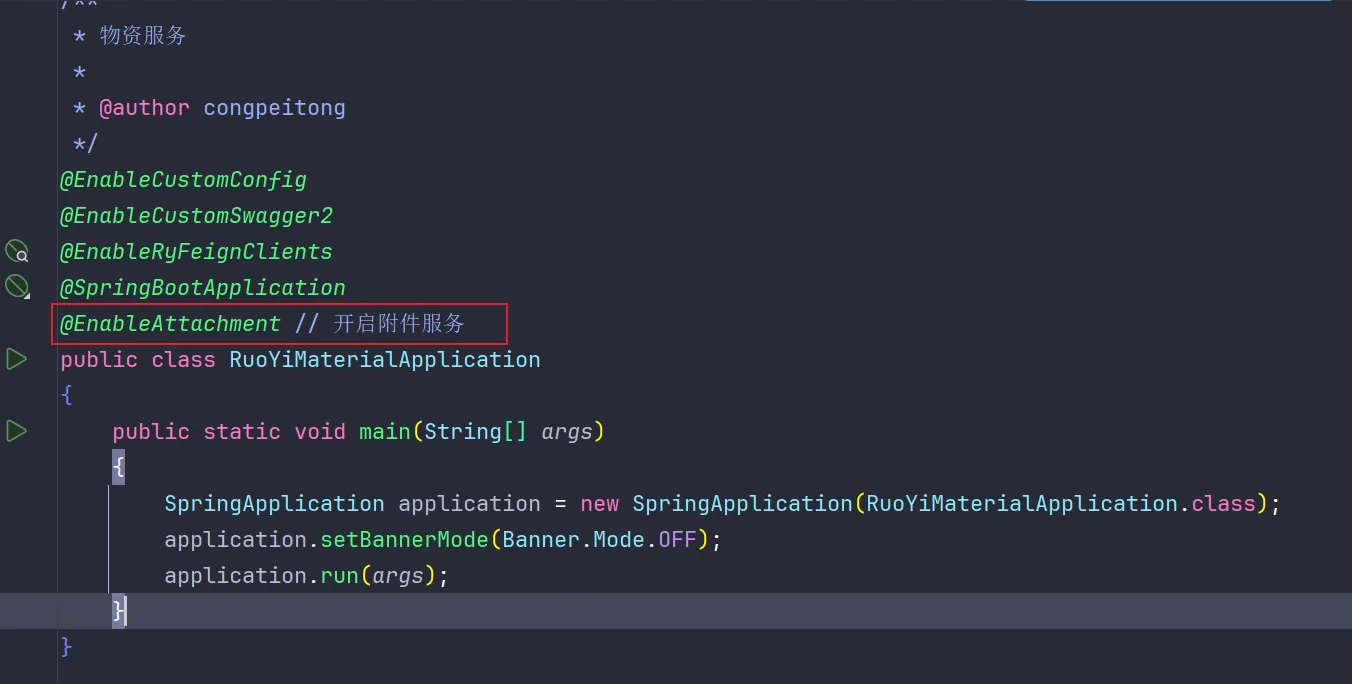
-
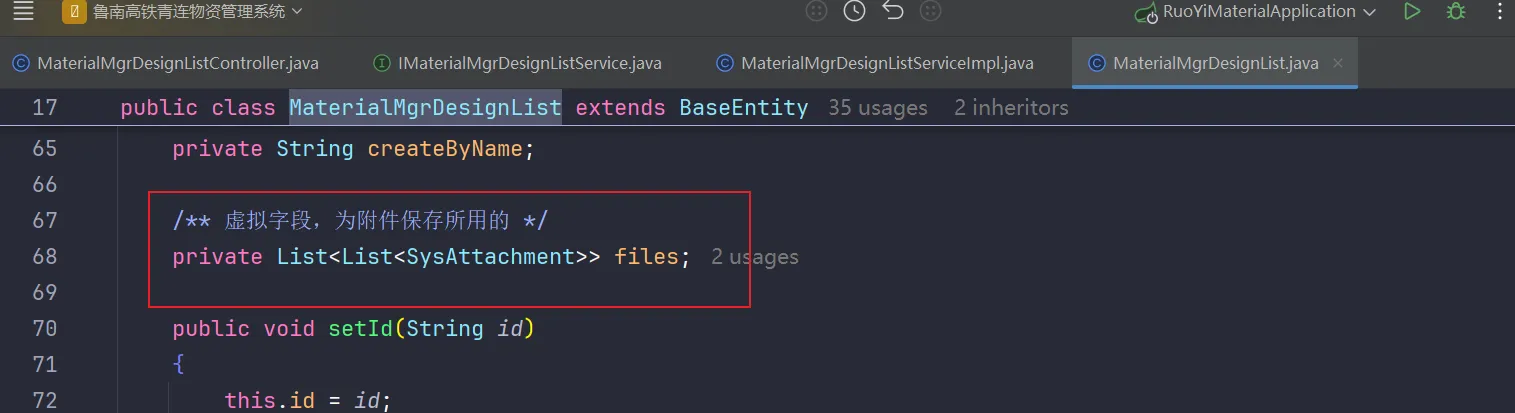
首先入参必须有二维数组,且名字是files,如果不想用files想看注解代码的释义
-
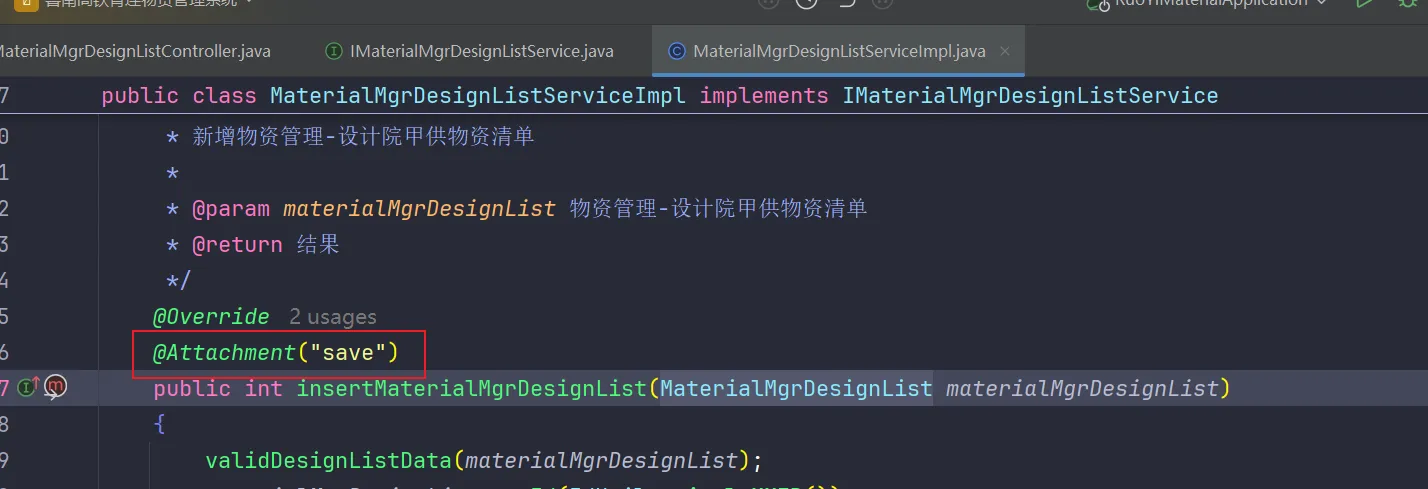
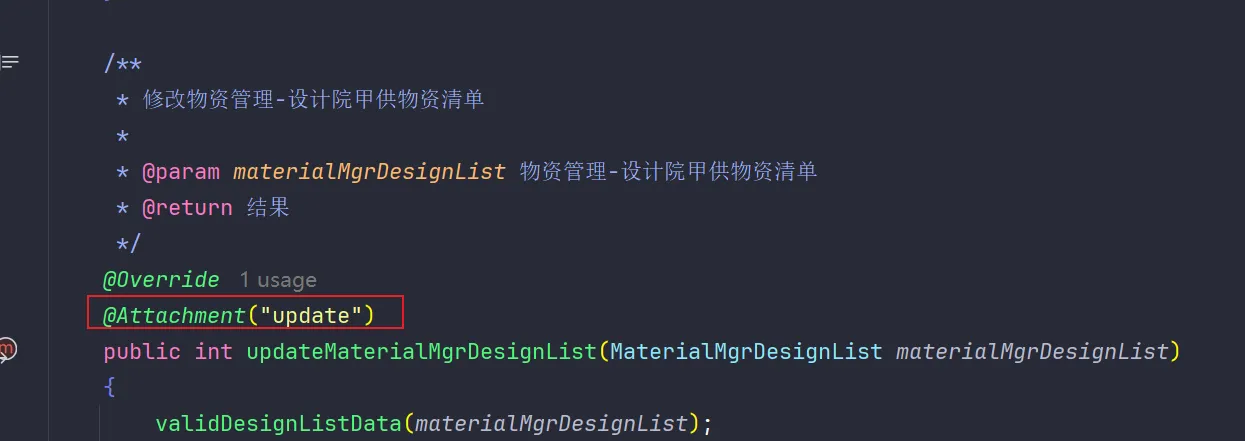
在保存附件的service方法上打上@Attachment注解,标注 是新增 save 还是 更新 update
5. 最终的释义说明**(mybatis xml的配置相当重要)**
### 数据库xml配置```yml# mybatis配置mybatis:    # 搜索指定包别名    typeAliasesPackage: com.ruoyi.material    # 配置mapper的扫描,找到所有的mapper.xml映射文件    mapperLocations: classpath*:mapper/**/*.xml
```~注意~:在 `mapperLocation` 中的 `classpath` 后面需要配置 *,否则服务之扫描本服务的xml文件,不会扫描引入的xml文件
正确:classpath*:mapper/**/*.xml错误:classpath:mapper/**/*.xml
### 开启使用如果想要使用ruoyi-common-file 需要 在启动类上加上 @EnableAttachment
### 附件保存和更新需要在相应的server类中添加@Attachment注解,具体使用详见注解文件中的注释
SpringBoot中通用附件的设计
本文链接: https://oxai.net.cn/posts/c102c1e5
本文采用 知识共享署名-非商业性使用-相同方式共享 4.0 国际许可协议 进行许可。
留言评论