
rabbitmq 优先级队列
发布时间:
更新时间:
🕒 阅读时间:3 min read
👀 阅读量:Loading...
一、创建相关资源
1、创建交换机
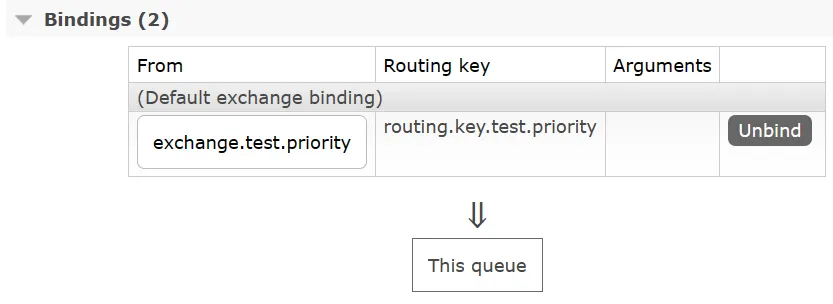
exchange.test.priority
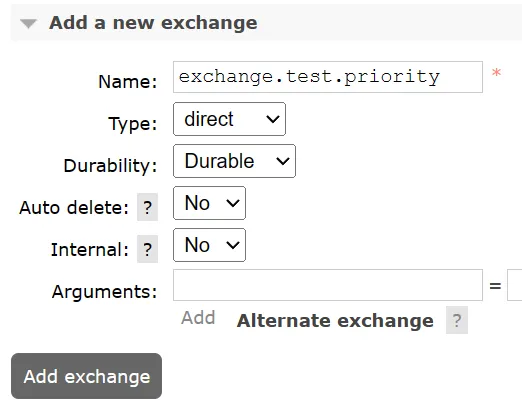
2、创建队列
queue.test.priority
x-max-priority
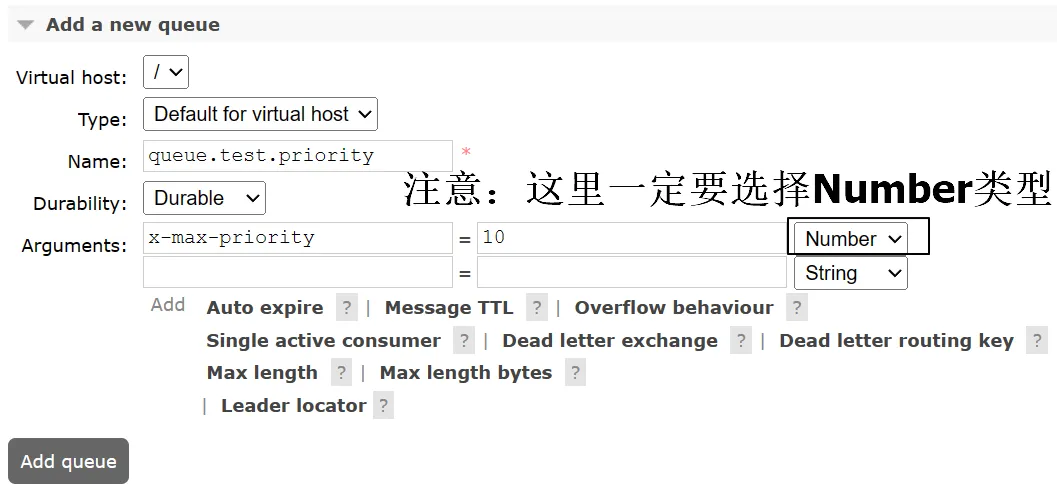
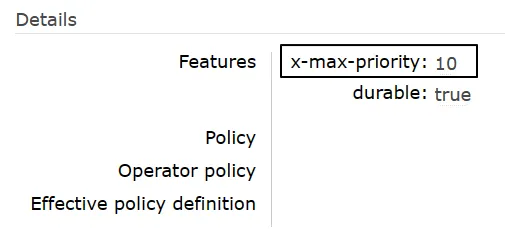
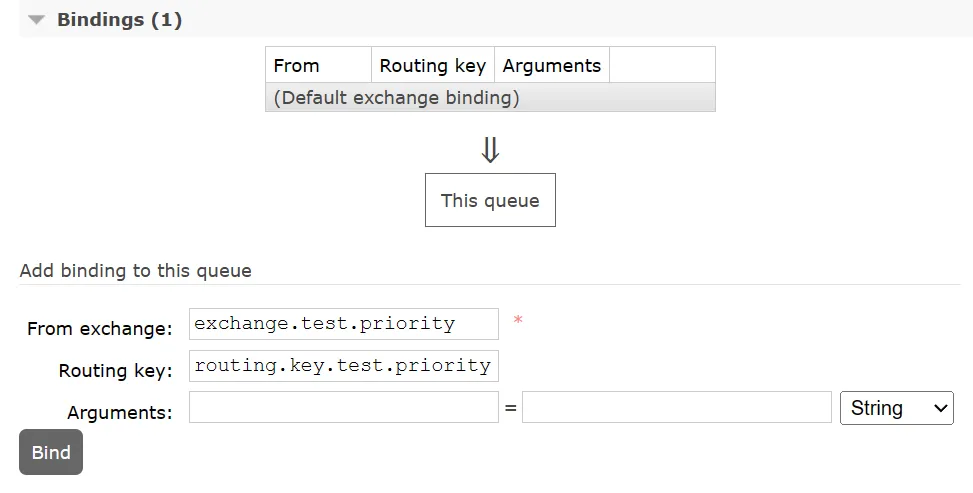
3、队列绑定交换机
二、生产者发送消息
1、配置POM
<parent>    <groupId>org.springframework.boot</groupId>    <artifactId>spring-boot-starter-parent</artifactId>    <version>3.1.5</version></parent>
<dependencies>    <dependency>        <groupId>org.springframework.boot</groupId>        <artifactId>spring-boot-starter-amqp</artifactId>    </dependency>    <dependency>        <groupId>org.springframework.boot</groupId>        <artifactId>spring-boot-starter-test</artifactId>    </dependency>    <dependency>        <groupId>org.projectlombok</groupId>        <artifactId>lombok</artifactId>    </dependency></dependencies>
2、配置YAML
spring: rabbitmq: host: 192.168.200.100 port: 5672 username: guest password: 123456 virtual-host: /3、主启动类
package com.atguigu.mq;
import org.springframework.boot.SpringApplication;import org.springframework.boot.autoconfigure.SpringBootApplication;
@SpringBootApplicationpublic class RabbitMQPriorityProducer {
    public static void main(String[] args) {        SpringApplication.run(RabbitMQPriorityProducer.class, args);    }
}
4、发送消息
- 不要启动消费者程序,让多条不同优先级的消息滞留在队列中
- 第一次发送优先级为1的消息
- 第二次发送优先级为2的消息
- 第三次发送优先级为3的消息
- 先发送的消息优先级低,后发送的消息优先级高,将来看看消费端是不是先收到优先级高的消息
①第一次发送优先级为1的消息
package com.atguigu.mq.test;
import jakarta.annotation.Resource;import org.junit.jupiter.api.Test;import org.springframework.amqp.rabbit.core.RabbitTemplate;import org.springframework.boot.test.context.SpringBootTest;
@SpringBootTestpublic class RabbitMQTest {
    public static final String EXCHANGE_PRIORITY = "exchange.test.priority";    public static final String ROUTING_KEY_PRIORITY = "routing.key.test.priority";
    @Resource    private RabbitTemplate rabbitTemplate;
    @Test    public void testSendMessage() {        rabbitTemplate.convertAndSend(EXCHANGE_PRIORITY, ROUTING_KEY_PRIORITY, "I am a message with priority 1.", message->{            message.getMessageProperties().setPriority(1);            return message;        });    }
}
②第二次发送优先级为2的消息
@Testpublic void testSendMessage() { rabbitTemplate.convertAndSend(EXCHANGE_PRIORITY, ROUTING_KEY_PRIORITY, "I am a message with priority 2.", message->{ message.getMessageProperties().setPriority(2); return message; });}③第三次发送优先级为3的消息
@Testpublic void testSendMessage() { rabbitTemplate.convertAndSend(EXCHANGE_PRIORITY, ROUTING_KEY_PRIORITY, "I am a message with priority 3.", message->{ message.getMessageProperties().setPriority(3); return message; });}
三、消费端接收消息
1、配置POM
<parent>    <groupId>org.springframework.boot</groupId>    <artifactId>spring-boot-starter-parent</artifactId>    <version>3.1.5</version></parent>
<dependencies>    <dependency>        <groupId>org.springframework.boot</groupId>        <artifactId>spring-boot-starter-amqp</artifactId>    </dependency>    <dependency>        <groupId>org.springframework.boot</groupId>        <artifactId>spring-boot-starter-web</artifactId>    </dependency>    <dependency>        <groupId>org.projectlombok</groupId>        <artifactId>lombok</artifactId>    </dependency></dependencies>
2、配置YAML
spring: rabbitmq: host: 192.168.200.100 port: 5672 username: guest password: 123456 virtual-host: /3、主启动类
package com.atguigu.mq;
import org.springframework.boot.SpringApplication;import org.springframework.boot.autoconfigure.SpringBootApplication;
@SpringBootApplicationpublic class RabbitMQPriorityConsumer {
    public static void main(String[] args) {        SpringApplication.run(RabbitMQPriorityConsumer.class, args);    }
}
4、监听器
package com.atguigu.mq.listener;
import com.rabbitmq.client.Channel;import lombok.extern.slf4j.Slf4j;import org.springframework.amqp.core.Message;import org.springframework.amqp.rabbit.annotation.*;import org.springframework.stereotype.Component;
@Slf4j@Componentpublic class MyMessageProcessor {
    public static final String QUEUE_PRIORITY = "queue.test.priority";
    @RabbitListener(queues = {QUEUE_PRIORITY})    public void processPriorityMessage(String data, Message message, Channel channel) throws IOException {        log.info(data);
        channel.basicAck(message.getMessageProperties().getDeliveryTag(), false);    }
}
5、测试效果
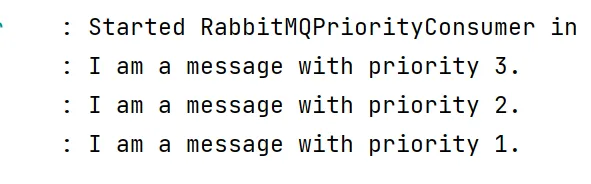
对于已经滞留服务器的消息,只要消费端一启动,就能够收到消息队列的投递,打印效果如下:
留言评论