
rabbitmq 路由模式
发布时间:
更新时间:
🕒 阅读时间:3 min read
👀 阅读量:Loading...
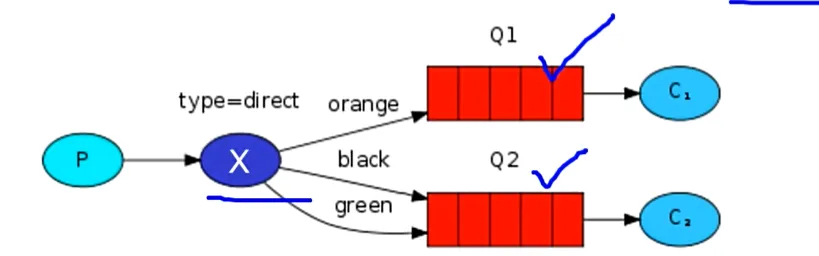
- 通过路由绑定的方式,把交换机和队列连接起来。
- 交换机和队列通过路由键进行绑定。
- 生产者发送消息时不仅要指定交换机还要指定路由键。
- 交换机接收到消息会发送到路由键绑定的队列。
- 在编码上Publish/Subscrible发布与订阅模式的区别。
- 交换机的类型为:Direct。
- 队列绑定交换机的时候需要指定routing key。
一、生产者代码
package com.atguigu.rabbitmq.routing;
import com.atguigu.rabbitmq.util.ConnectionUtil;import com.rabbitmq.client.BuiltinExchangeType;import com.rabbitmq.client.Channel;import com.rabbitmq.client.Connection;import com.rabbitmq.client.ConnectionFactory;
public class Producer {
    public static void main(String[] args) throws Exception {
      Connection connection = ConnectionUtil.getConnection();
      Channel channel = connection.createChannel();
      String exchangeName = "test_direct";
      // 创建交换机      channel.exchangeDeclare(exchangeName,BuiltinExchangeType.DIRECT,true,false,false,null);
      // 创建队列      String queue1Name = "test_direct_queue1";      String queue2Name = "test_direct_queue2";
      // 声明(创建)队列      channel.queueDeclare(queue1Name,true,false,false,null);      channel.queueDeclare(queue2Name,true,false,false,null);
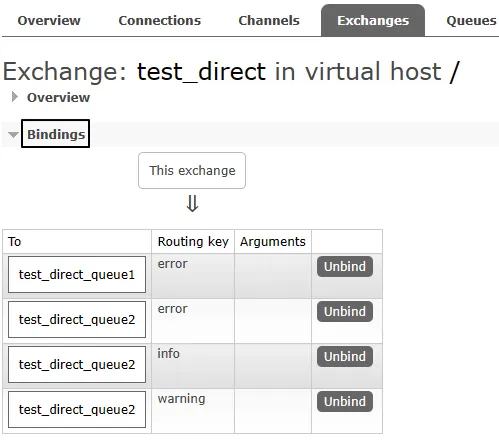
      // 队列绑定交换机      // 队列1绑定error      channel.queueBind(queue1Name,exchangeName,"error");
      // 队列2绑定info error warning      channel.queueBind(queue2Name,exchangeName,"info");      channel.queueBind(queue2Name,exchangeName,"error");      channel.queueBind(queue2Name,exchangeName,"warning");
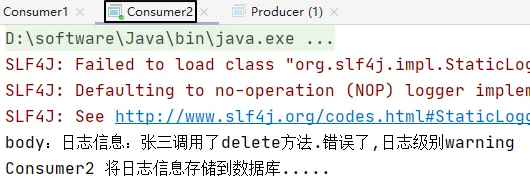
        String message = "日志信息:张三调用了delete方法.错误了,日志级别warning";
        // 发送消息        channel.basicPublish(exchangeName,"warning",null,message.getBytes());        System.out.println(message);
      // 释放资源        channel.close();        connection.close();
    }
}
二、消费者代码
1、消费者1号
package com.atguigu.rabbitmq.routing;
import com.atguigu.rabbitmq.util.ConnectionUtil;import com.rabbitmq.client.*;import java.io.IOException;
public class Consumer1 {
    public static void main(String[] args) throws Exception {
        Connection connection = ConnectionUtil.getConnection();
        Channel channel = connection.createChannel();
        String queue1Name = "test_direct_queue1";
        channel.queueDeclare(queue1Name,true,false,false,null);
        Consumer consumer = new DefaultConsumer(channel){
            @Override            public void handleDelivery(String consumerTag, Envelope envelope, AMQP.BasicProperties properties, byte[] body) throws IOException {
                System.out.println("body:"+new String(body));                System.out.println("Consumer1 将日志信息打印到控制台.....");
            }
        };
        channel.basicConsume(queue1Name,true,consumer);
    }
}
2、消费者2号
package com.atguigu.rabbitmq.routing;
import com.atguigu.rabbitmq.util.ConnectionUtil;import com.rabbitmq.client.*;import java.io.IOException;
public class Consumer2 {
    public static void main(String[] args) throws Exception {
        Connection connection = ConnectionUtil.getConnection();
        Channel channel = connection.createChannel();
        String queue2Name = "test_direct_queue2";
        channel.queueDeclare(queue2Name,true,false,false,null);
        Consumer consumer = new DefaultConsumer(channel){
            @Override            public void handleDelivery(String consumerTag, Envelope envelope, AMQP.BasicProperties properties, byte[] body) throws IOException {
                System.out.println("body:"+new String(body));                System.out.println("Consumer2 将日志信息存储到数据库.....");
            }
        };
        channel.basicConsume(queue2Name,true,consumer);
    }
}
三、运行结果
1、绑定关系
2、消费消息
留言评论